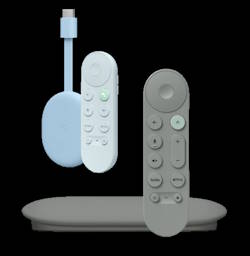
Google TV Streamer will replace Chromecast with Google TV 4K/HD (the only Chromecast device in the market now) in September 2024. Is this the end of the Chromecast? How about Google TV Streamer vs Chromecast with Google TV?
This Chromecast guide answers questions you may have about the transition to Google TV Streamer and the comparison of Google TV Streamer vs Chromecast with Google TV. The guide will also explain the differences between Google TV Streamer and Chromecast with Google TV, the improvements, and the new features of the Google TV Streamer.
Chromecast with Google TV has two versions: 4K (up to 4K 60fps) and HD (up to 1080p). In this post, they will not be distinguished. Unless the HD version is singled out, you can assume it refers to the 4K version.
Does it mean the end of Chromecast? No, Chromecast has been just a software feature since Chromecast with Google TV.
Google already stopped Chromecast devices when Chromecast with Google TV was released in 2020.
Chromecast with Google TV is essentially an Android TV (switched from Chrome OS) with a Google TV UI in the name of Chromecast. It can do everything Chromecast (and Chromecast Ultra) can do and can do more (although some owners may not appreciate it). The only hole left is Chromecast Audio, which Google killed without offering a replaceable product. You have to use some workarounds to get some features of Chromecast Audio from a Chromecast device.
The Chromecast support (aka screen cast, or screen mirroring in the early days) feature was baked into Android OS after the release of the original Chromecast in 2013. Google did more on Android TV OS. Since then, especially since 2017, most new Android TVs and Android TV setup boxes have a feature called Chromecast built-in. Chromecast devices have been redundant on these devices. Of course, on other TVs or monitors, you may still need to get a Chromecast dongle.
So, Google TV Streamer is an evolutionary product of Chromecast with Google TV. Chromecast is now officially dropped from the product name. Therefore, the Chromecast product category becomes history.
However, all Chromecast features have been preserved in the Google TV Streamer. As a Chromecast user, you will not lose anything (except paying more).
Q2: When will Google stop offering software updates for Chromecast with Google TV? An educated guess is sometime around 2030.
The last firmware update for the original Chromecast (1st gen) was released in November 2022. Google announced the end of support for the 1st Gen Chromecast in 2023. So, 9-10 years of support were offered for the original Chromecast. This is consistent with Google’s commitment to support Chromebook and Pixel devices (around 7 years).
So, if we make an educated guess, we can assume Google will probably stop the security update for Chromecast with Google TV around 2030 (10 years after its initial release). In March 2025, the second generation of Chromecast (Chromecast 2015) experienced device validation errors due to an expired device certificate, and Google immediately released a firmware update.
Anyway, we have to wait for Google’s announcement.


New features and improvements of Google TV Streamer vs Chromecast with Google TV
As mentioned, Google TV Streamer is not a totally new product. It is an incremental successor to Chromecast with Google TV. What made the product newsworthy was dropping Chromecast in the product name and stopping the Chromecast product line.
Because Google wants Google TV Streamer to tackle a different and highly competitive TV streaming box market (e.g., Roku, Fire TV, and Apple TV), some new features and improvements were introduced in the Google TV Streamer (vs Chromecast with Google TV), including:
- A new “box” design.
- Revamped voice remote.
- Google AI.
- 20% faster CPU.
- Double RAM (4GB).
- 4X storage (32GB).
- Matter smart home integration.
- Dolby Atmos audio support.
- Double price.
A new “box” design
Google wants Google TV Streamer to be a setup box, not a dongle. Hence, we can see a new slanted box design for Google TV Streamer. This design suggests Google TV Streamer is not designed to hide behind the TV.
With the new design of the Google TV Streamer, the most useful addition is the Ethernet port. You do not need to use the Ethernet dongle for the Streamer if you prefer a wired connection over a wireless connection.
Another interesting addition to the new design is the Find the Remote button, allowing you to locate the remote. You can press it to beep the voice remote (and light up the LED on the Remote).
Revamped voice remote
Just like Chromecast with Google TV, Google TV Streamer comes with a similar (and revamped) voice remote.
The major changes in the voice remote include:
- It is now slightly larger.
- Volume buttons are now in the front, not the side.
- The button layout is slightly changed.
Google AI
Google Assistant is replaced with Google AI.
Google TV Streamer leverages Google’s advanced AI capabilities (mainly Gemini) to enhance its features. For example, you can get full summaries, reviews, and season-by-season breakdowns of content. So it is easy to find the content you want to watch.
Google TV Streamer vs Chromecast with Google TV: 20% faster CPU
This is not a joke. Google even highlighted this “20%” improvement in CPU speed without revealing the exact chip used. Remember, this comparison is against the chip used in the Chromecast with Google TV, which was introduced in 2020.
Although streaming devices seldom demand too much CPU, the 20% improvement is a bit laughable. If you already feel sluggish in opening apps, search shows, or switching shows, you will very likely have the same pain with Google TV Streamer.
Some guys found out this 2024 Google TV Streamer is very likely using the same chip (MediaTek MT8696) as the 2021/2023 Fire TV Stick 4K Max. It is not impressive.


Google TV Streamer vs Chromecast with Google TV: Double the RAM (4GB)
Google TV Streamer bumped the memory to 4GB, which doubles that in Chromecast with Google TV 4K (the HD version only has 1.5GB RAM). Most streaming devices still have 1-2GB RAM. Some geeks now can play more with the developer options and customize more with the ADB.
Google TV Streamer vs Chromecast with Google TV: 4X storage (32GB)
One of the common complaints of Chromecast with Google TV is the limited storage. Almost half of the 8GB storage is used by the OS. It is almost impossible to install more than 10 additional apps, like SmartTube.
Finally, Google addressed this issue with the 32GB storage. You can install many more apps, like VLC for Android and Prime Video. However, many users may expect more for the $100 price tag.
Matter and Thread support
In addition to Google Home, Google TV Streamer now has built-in Matter and Thread support.
So, you can use Google TV Streamer as the center control panel for your smart home devices.
In comparison, Chromecast with Google TV only supports Google Home.
Dolby Atmos audio support
Google TV Streamer adds support for Dolby Atmos audio. Chromecast with Google TV only supports Dolby-encoded audio via HDMI passthrough.
Double the price
The list price of Google TV Streamer is $99.99, which is 2x the list price of Chromecast with Google TV.
It is also more expensive than the Amazon Fire TV Stick 4K Max.
Common features of Google TV Streamer vs Chromecast with Google TV
For Chromecast with Google TV users, many features remain unchanged on the Google TV Streamer. For example:
- Google TV interface.
- Voice control. Although Google Assistant is replaced with Google AI, you will not feel the difference in voice control.
- Google Home integration. The added support for Matter and Thread is for users who own such devices.
- Casting from other devices, including streaming local media content.
Do you have any questions about Google TV Streamer vs Chromecast with Google TV?
If you want to share your thoughts on Google TV Streamer vs Chromecast with Google TV or have questions about the new features of Google TV Streamer, please let us know in the comment box below.
The community will try to help you find the solution.
For Chromecast Audio guides, please visit the Chromecast Audio guide page.
If your question is on Chromecast, including Chromecast Ultra, 1st generation Chromecast, 2nd gen Chromecast (aka Chromecast 2015), and the 3rd gen Chromecast (Chromecast 2018), please visit the Chromecast how-to guides page.



sports nets in hyderabad says
Best Quality Sports Nets provider- AB SAFETY NETS
WhatsApp CRM review says
Thanks for sharing this valuable post.