
Only one audio output port, but you can use 3 different types of audio cables for Chromecast Audio.
Chromecast Audio, like Chromecast, is very simple in design and use.
There are only two ports: one micro USB port for power adapter. The other port on the opposite side is for audio cables.
So, there is no reason to insert the audio cables for Chromecast Audio in the wrong port.
But you may not know the single 3.5-mm audio port can be used for 3 different types of compatible audio cables for Chromecast Audio:
- 3.5-mm stereo cable for analog output. The yellow audio cable is included in your Chromecast Audio box
- 3.5-mm-stereo-to-RCA cable for analog output. This audio cable is NOT included.
- Mini TOSLINK-to-TOSLINK optical cable for digital output. This optical audio cable is NOT included.
Although you can use 3 different audio cables for Chromecast Audio, you cannot use them simultaneously because there is only one port.
Even if you use an audio jack splitter, the audio output format is determined by the audio cable inserted into the output port.
What are the differences between the three compatible audio cables for Chromecast Audio?
The 3 types of compatible audio cables for Chromecast Audio are designed for different usages. You need to match it with your speaker or AV receiver.
If your speaker or AV receiver accepts more than one type of the 3 audio cables, you may want to understand the differences so that you can get the best audio quality.
Or if you are planning to buy a new speaker or AV system for your Chromecast Audio, you may want to check the possible inputs for the speaker or AV system.
3.5-mm stereo cable
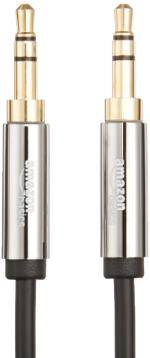
Most speakers, including most Bluetooth speakers, have an input port for a 3.5-mm stereo cable. And Google includes this yellow (lemonade) cable in the box already.
So, this is the simplest and cheapest solution if your speaker or sound system supports it.
3.5-mm stereo cable is for analog audio output. This means if you plug in a 3.5-mm stereo cable, the DAC (Digital-to-analog converter) in Chromecast Audio will convert the digital audio signal into an analog audio signal automatically.
If your sound system supports digital input and has a high-end DAC, you may want to use a digital TOSLINK optical cable to benefit from the possibly better DAC.
Please note Chromecast Audio, although cheap, has a decent DAC. The DAC in Chromecast is an AKM AK4430 192kHz 24-bit stereo DAC, according to iFixit’s teardown. The sound quality should be comparable to most AV receivers with a price tag of about $200-$500.
The 3.5-mm stereo cable can only carry an unbalanced audio signal for stereo audio, and therefore, it is susceptible to electromagnetic interference. This is the reason why the cable should be as short as possible.
Technically, the 3.5-mm stereo cable uses the TRS (tip-ring-sleeve) connector.

- IN THE BOX: 4-foot 3.5mm male-to-male stereo audio cable transmits audio in stereo format
- DEVICE COMPATIBILITY: Works with any device equipped with standard 3.5mm audio jack or AUX-in port
- CONVENIENT: Connects compatible devices like a smartphone, MP3 player, or tablet to a car stereo or portable speaker
- SECURE FIT: Beveled step-down design for a secure connection
- CLEAR SOUND: Corrosion-resistant gold-plated plugs for reliable, static-free performance

3.5-mm-stereo-to-RCA cable
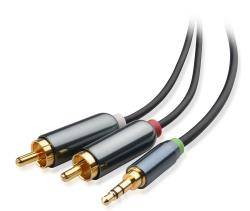
If your speaker or AV receiver does have RCA jacks, you need to get a 3.5-mm stereo to RCA cable, which should be quite cheap.
RCA cable and jacks are based on very old standards of Radio Corporation of America. Two separate cables transmit two mono audio signals individually.
The 3.5-mm-stereo-to-RCA cable is actually a mini converter: one end uses TRS connector (for Chromecast Audio), and the other end uses an RCA connector (for your speaker)
So, Chromecast Audio treats a 3.5-mm-stereo-to-RCA cable as a normal 3.5-mm stereo cable.
You probably can find this 3.5-mm-stereo-to-RCA cable for your Chromecast Audio in the garage. If not, you can easily get it for a few bucks from most hardware shops.

- IN THE BOX: 4-foot audio adapter cable with (1) 3.5mm Male connector on one end and (2) Male RCA connectors on the other end
- CLEAR AUDIO: Dual-shielding, polished metal connectors, and a corrosion-resistant gold-plated 3.5mm connector for pure, clear audio and minimal signal loss
- STANDARD AUX JACK: Works with left and right audio input and devices with a standard 3.5mm auxiliary jack (typically used for headphones or ear buds)
- CONNECTS DEVICES: Easily connects devices like a smartphone, tablet, or MP3 player to a speaker, stereo receiver, or other RCA-enabled device
Mini TOSLINK to TOSLINK optical cable
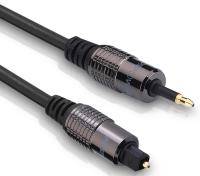
TOSLINK (Toshiba Link) is a standardized optical fiber connection system for digital audio.
Compared to analog audio signals through stereo cables, there is no interference for digital audio. This is the reason why most HiFi systems prefer digital input (or coaxial).
The digital audio signal is processed by your speaker or AV receiver. It is converted to analog output eventually with their own DACs.
So, technically, Mini TOSLINK to TOSLINK optical audio cables for Chromecast Audio can only avoid signal interference. There is no guarantee of better audio quality.
But generally speaking, most sound systems or speakers with digital input usually have decent DACs inside. And they usually optimize and fine-tune the speaker (and firmware) for that specific DAC chip. This is the reason why the audio quality usually is very good in such systems.
The optical audio cable is NOT included in your Chromecast Audio box. You can get a 6-feet one at about $10.

- [OPTICAL MINI TOSLINK TO TOSLINK CABLE] Mini 3.5mm Toslink/optical cables will NOT convert digital audio signals (optical/Toslink) into analog signals or the other way round. This is not an analog to digital converter cable. OPTICAL cables will NOT plug into standard 3.5mm headphone jack and convert analog audio signals into digital audio with optical light. It is specifically used to transmit digital (optical) audio only.
- [COMPATIBLE DEVICES] The optical 3.5mm connector mini TOSLINK cables are made for specific devices such as iMacs, TVs and Notebooks that have a built in 3.5mm OPTICAL port. iPhones/smartphones do NOT have optical 3.5mm ports
- [PREMIUM FIBER CORE AND METAL CONNECTORS] Low-loss, low-jitter, maximum signal transfer, precision polished fiber core eliminates RF, EM, and ground loop interference. Metal connectors dampen vibration
- [24K GOLD-PLATED FERRULES & STRAIN-RELIEF PVC JACKET] Resist corrosion, reduce tarnish, and provide maximum protection for the fiber tip. Quality PVC jacket contributes to the OD5.0mm strain-relief construction that not only provides flexibility, but also protects the cable from kinks.
- [LIMITED LIFETIME WARRANTY] Includes a Limited Lifetime Warranty
What’s the audio quality of Chromecast Audio output? Why audio cables for Chromecast Audio matter?
Chromecast Audio, although with decent output audio quality, is not a high-end HiFi device.
The $35 price tag is reality.
But Chromecast Audio is seldom the bottleneck for audio quality in your sound system.
The final audio quality of your ear is affected by the following:
- the speaker;
- the amplifier;
- the DAC;
- signal interference and signal distortion;
- media source quality.
The audio quality is always limited by the worst one. For example, if you have a densely compressed and distorted audio source file, there is no way to get decent audio quality, no matter what audio system you have.
Chromecast Audio may affect audio quality in the following three aspects:
- DAC if you use the analog output (i.e., using 3.5-mm stereo cable or 3.5-mm-to-RCA cable). As mentioned on several pages, the DAC in Chromecast Audio is a decent one. It seldom is the bottleneck for a speaker or AV receiver with only analog input.
- Signal interference and distortion if using a 3.5-mm stereo cable or 3.5-mm-to-RCA audio cables for Chromecast Audio. Because both of these two cables handle only unbalanced analog audio, it is impossible to shield all interference. But if the cable is short and the connector is in good condition, this, again, is seldom a problem. Don’t complain about the length of the 3.5-mm cable in your Chromecast Audio box. The shorter, the better for audio quality.
- Media source quality. This actually is not controlled by Chromecast Audio. It depends on content providers. The dual-band with 802.11 AC WiFi connection in Chromecast Audio is overkill even for streaming lossless audio.
So, to get the best audio quality from Chromecast Audio, you may consider:
- If your speaker or AV receiver supports digital input, try to use TOSLINK optical audio cables for Chromecast Audio.
- If possible, use short audio cables for analog output. The shorter, the better.
- If you have the choice, choose a high-quality streaming source. If you stream local music files, try to get lossless files, e.g., FLAC.
- Within your budget, try to get quality speakers or sound systems. You should try to avoid the cheap Bluetooth speakers (with analog input) sold in many handphone shops. These speakers are designed for “Bluetooth” quality. Of course, there are many decent speakers with Bluetooth connectivity. This is a totally different story.
And most importantly, trust your ears, not the price tag. Cheap solutions can be good enough for you.
Are you using the correct audio cables for Chromecast Audio? Do you know how to get the best audio quality for Chromecast Audio?
If you have any questions or encounter any problems with the three compatible audio cables for Chromecast Audio or audio quality for Chromecast Audio, please let us know in the comment box below.
The community will try to help you find the answer or solution.
For more Chromecast Audio guides, please visit the Chromecast Audio guide page.
If your question is on Chromecast, including both 1st generation Chromecast and new Chromecast (aka Chromecast 2015), please visit the Chromecast how-to guides page.



Brian says
Hello I have question for you, toslink should be lit in red at the end cable when you connect it to CCA right? and I think it should in order for it to transmitted the signal to my Receiver, the reason why is that my CD player did showed that red beam at the end of that optical cable,that being said I think my CCA is not working no audio out at all ,we’ll it time to return it.
Thanks
simon says
Did you get audio if you use the bundled 3.5mm stereo cable in the Chromecast audio? Did you finish the initial setup?
To stream local media, please read this guide: Comparison of 5 methods for streaming local media files to Chromecast
Chromecast or Miracast? Please read this guide: Chromecast VS Miracast: everything you need know about Chromecast, wireless display and screen mirroring || Samsung Galaxy S25 Guides || Samsung Galaxy S23 Guides || Galaxy S6 Guides || Galaxy S7 Guides || Android Guides || Galaxy S8 Guides || Galaxy S9 Guides || Google Home Guides || Galaxy S10 Guides || Headphone Guides || Galaxy S20 Guides || Samsung Galaxy S21 Guides || Samsung Galaxy S22 Guides || Galaxy Note Guides || Fire tablet guide || Moto G Guides || Moto E Guides
Brian B says
Thank you for your quick reply,yes all set up has been set and ready to cast,my Hifi system does support Digital input and output, and also has DAC build in as well,it’s work just fine with my Bluetooth with build in Aptx, with Coaxial output to my Preamp input, the sound is good but not excellent because the bandwith is bottleneck and lack of details compared to CD.
Since CCA has DAC build in and WiFi I want to give it a try, to answer your question above my Hifi Preamp does not have 3.5mm jack support and I don’t own any Bluetooth speakers either,as I said before when I plug in Mini Toslink to it you’ll see that red beam but just for a few seconds then it turned off, while my CD player Optical lit in red beam signal, however I chose
Spotify to cast as well as Google play nothing happened the sound coming from my tablet but not my Hifi system,don’t you think it’s could be a false unit? The only thing I think that, that Toslink RED Beam should be on when connected from CCA.
Thanks again.
Brian
simon says
I still have problems to figure out your HiFi system configuration.
To test Chromecast audio, just use any speaker with 3.5mm input and connect Chromecast audio directly to it.
In Google play music, or Spotify, after tapping the casting icon and select the Chromecast audio device, the music output from the app should not go to tablet at all. If Chromecast audio is not working, you will not hear the music. It will not fail over to tablet until you stop casting.
Also, when you setup Chromecast, it should ask you whether you hear the sound from the speaker.
To stream local media, please read this guide: Comparison of 5 methods for streaming local media files to Chromecast
Chromecast or Miracast? Please read this guide: Chromecast VS Miracast: everything you need know about Chromecast, wireless display and screen mirroring || Samsung Galaxy S25 Guides || Samsung Galaxy S23 Guides || Galaxy S6 Guides || Galaxy S7 Guides || Android Guides || Galaxy S8 Guides || Galaxy S9 Guides || Google Home Guides || Galaxy S10 Guides || Headphone Guides || Galaxy S20 Guides || Samsung Galaxy S21 Guides || Samsung Galaxy S22 Guides || Galaxy Note Guides || Fire tablet guide || Moto G Guides || Moto E Guides
John O'Kelly says
Can I connect chromecast audio to a digital coax input on my receiver
simon says
No, Chromecast doesn’t have a coax output.
To stream local media, please read this guide: Comparison of 5 methods for streaming local media files to Chromecast
Chromecast or Miracast? Please read this guide: Chromecast VS Miracast: everything you need know about Chromecast, wireless display and screen mirroring || Samsung Galaxy S25 Guides || Samsung Galaxy S23 Guides || Galaxy S6 Guides || Galaxy S7 Guides || Android Guides || Galaxy S8 Guides || Galaxy S9 Guides || Google Home Guides || Galaxy S10 Guides || Headphone Guides || Galaxy S20 Guides || Samsung Galaxy S21 Guides || Samsung Galaxy S22 Guides || Galaxy Note Guides || Fire tablet guide || Moto G Guides || Moto E Guides
AMG says
I know your question was posted at the beginning of the year, so you may have found a solution already. I just read this helpful article today after receiving the device as a birthday gift yesterday. While the Chromecast Audio output does not allow for digital coax, there are mini Toslink to digital coax cables available for purchase from a variety of manufacturers and vendors. I believe one of those would suit you and your application.
John O'Kelly says
Thank you for your suggestions. By rearranging my inputs on my receiver, I was able to free up a position so that I could use the 3.5 m/m to two RCA connectors cable.
Olaf says
I connected the CCA via Toslink with my DAC. Sounds pretty good. But not as detailed and “roomy” (excuse; l’m Dutch) as my CD player. Could it get better if I use the coax entry of the DAC (by using a Toslink/Coax transmitter for €20,-)?
simon says
The quality is also determined out limited by the music source. Most streaming service providers offer compressed music only.
In your case, the cable probably is not so important.
To stream local media, please read this guide: Comparison of 5 methods for streaming local media files to Chromecast
Chromecast or Miracast? Please read this guide: Chromecast VS Miracast: everything you need know about Chromecast, wireless display and screen mirroring || Samsung Galaxy S25 Guides || Samsung Galaxy S23 Guides || Galaxy S6 Guides || Galaxy S7 Guides || Android Guides || Galaxy S8 Guides || Galaxy S9 Guides || Google Home Guides || Galaxy S10 Guides || Headphone Guides || Galaxy S20 Guides || Samsung Galaxy S21 Guides || Samsung Galaxy S22 Guides || Galaxy Note Guides || Fire tablet guide || Moto G Guides || Moto E Guides
Brian L says
Thank you for the informative post. I was on Google’s website, trying to determine output options and cable types and this post explained everything I needed. I’m off to buy a TOSLINK cable now… Tanks
simon says
Enjoy you Chromecast audio.
To stream local media, please read this guide: Comparison of 5 methods for streaming local media files to Chromecast
Chromecast or Miracast? Please read this guide: Chromecast VS Miracast: everything you need know about Chromecast, wireless display and screen mirroring || Samsung Galaxy S25 Guides || Samsung Galaxy S23 Guides || Galaxy S6 Guides || Galaxy S7 Guides || Android Guides || Galaxy S8 Guides || Galaxy S9 Guides || Google Home Guides || Galaxy S10 Guides || Headphone Guides || Galaxy S20 Guides || Samsung Galaxy S21 Guides || Samsung Galaxy S22 Guides || Galaxy Note Guides || Fire tablet guide || Moto G Guides || Moto E Guides
Mike says
Is Chromecast Audio similar in functionality with AirTry? http://www.airtry.com/xe/Homepage
I’m currently looking for the best quality/price relation product to connect wirelessly my active speakers (Swans M200MKII) with my PC and play .mp3 and .flac music stored on my drive. Is it possible with Chromecast Audio?
simon says
I never try the AirTry. So, I cannot comment on it.
For Chromecast Audio, it is NOT a wireless audio transmitter. It is a streaming device. Its main usage is for internet streaming. But, you can play (stream) local music to it as well. If you have a sizable collection, you can use Plex media server on the PC.
Of course, for FLAC and other loseless music files, direct connection to PC (if your PC has digital audio output or has a good sound card), usually gives better quality than any wireless solutions.
To stream local media, please read this guide: Comparison of 5 methods for streaming local media files to Chromecast
Chromecast or Miracast? Please read this guide: Chromecast VS Miracast: everything you need know about Chromecast, wireless display and screen mirroring || Samsung Galaxy S25 Guides || Samsung Galaxy S23 Guides || Galaxy S6 Guides || Galaxy S7 Guides || Android Guides || Galaxy S8 Guides || Galaxy S9 Guides || Google Home Guides || Galaxy S10 Guides || Headphone Guides || Galaxy S20 Guides || Samsung Galaxy S21 Guides || Samsung Galaxy S22 Guides || Galaxy Note Guides || Fire tablet guide || Moto G Guides || Moto E Guides
Mike says
Nope, unfortunately I don’t have a digital audio output and my sound card is a regular notebook on-board one.
So what type of devices we have out there? What’s the difference between streaming devices and audio transmitters? And finally, back to my first question – if my aim is to only stream music from the PC (I’m not using Spotify or Google Music) is Chromecast Audio a good choice? Or maybe you know some better alternatives? Thanks in advance!
simon says
Yes, you can play music from the PC to the speaker through Chromecast audio. The music quality should be far better than Bluetooth.
Please note, Chromecast audio requires internet connection even you play music locally. Chromecast android must connect to the same router as the PC. It doesn’t use internet bandwidth, but it requires active internet connection.
Wireless transmitter is usually expensive and there is no standard. Chromecast audio is far cheaper.
To stream local media, please read this guide: Comparison of 5 methods for streaming local media files to Chromecast
Chromecast or Miracast? Please read this guide: Chromecast VS Miracast: everything you need know about Chromecast, wireless display and screen mirroring || Samsung Galaxy S25 Guides || Samsung Galaxy S23 Guides || Galaxy S6 Guides || Galaxy S7 Guides || Android Guides || Galaxy S8 Guides || Galaxy S9 Guides || Google Home Guides || Galaxy S10 Guides || Headphone Guides || Galaxy S20 Guides || Samsung Galaxy S21 Guides || Samsung Galaxy S22 Guides || Galaxy Note Guides || Fire tablet guide || Moto G Guides || Moto E Guides
Ryan Buck says
I’d like to connect CCA to the binding posts on the wall plate in my house. The binding posts accept bare speaker wire. What adapter do I need?
simon says
Maybe Banana plug to RCA adaptor can do the job. I never tried this and I cannot recommend a specific product. But there are a few in Amazon.
To stream local media, please read this guide: Comparison of 5 methods for streaming local media files to Chromecast
Chromecast or Miracast? Please read this guide: Chromecast VS Miracast: everything you need know about Chromecast, wireless display and screen mirroring || Samsung Galaxy S25 Guides || Samsung Galaxy S23 Guides || Galaxy S6 Guides || Galaxy S7 Guides || Android Guides || Galaxy S8 Guides || Galaxy S9 Guides || Google Home Guides || Galaxy S10 Guides || Headphone Guides || Galaxy S20 Guides || Samsung Galaxy S21 Guides || Samsung Galaxy S22 Guides || Galaxy Note Guides || Fire tablet guide || Moto G Guides || Moto E Guides
Dan says
I have an early 70s Sansui receiver. I bought a 3.5mm to RCA cable to plug into the AUX port of the receiver. I am hearing a very loud buzz sound through my mid 80s Klipsch loudspeakers. The receiver and the CCA usb-power supply are plugged into the same power bar. I read somewhere to plug the CCA into a wall outlet and not a power bar (which I did), however this did not work. Any other suggestions to remove this annoying buzz? Is there a way to upgrade the power source of the Chromecast? Thanks.
simon says
Did you hear the buzz sound without casting anything? If yes, it’s very likely due to the cables/connectors, not Chromecast audio. Did you test it with other devices (e.g., mobile phone) for the same cable and port on the receiver?
You can insert power adapter into any socket as long as the voltage is correct. Just don’t insert the USB cable to your receiver or PC (without using the adapter).
To stream local media, please read this guide: Comparison of 5 methods for streaming local media files to Chromecast
Chromecast or Miracast? Please read this guide: Chromecast VS Miracast: everything you need know about Chromecast, wireless display and screen mirroring || Samsung Galaxy S25 Guides || Samsung Galaxy S23 Guides || Galaxy S6 Guides || Galaxy S7 Guides || Android Guides || Galaxy S8 Guides || Galaxy S9 Guides || Google Home Guides || Galaxy S10 Guides || Headphone Guides || Galaxy S20 Guides || Samsung Galaxy S21 Guides || Samsung Galaxy S22 Guides || Galaxy Note Guides || Fire tablet guide || Moto G Guides || Moto E Guides
Mario Morales says
What did you think, speaking on audio quality in a Chromecast HDMI vs Chromecast Audio (with TOSLINK) connected to a new generation Sony receiver?
simon says
Chromecast and Chromecast Audio are designed for different applications. You need to know what you want.
For audio quality, it depends on the original quality, internet bandwidth, and DAC. If you use Toslink to the receiver, the DAC in the Sony receiver will be used.
To stream local media, please read this guide: Comparison of 5 methods for streaming local media files to Chromecast
Chromecast or Miracast? Please read this guide: Chromecast VS Miracast: everything you need know about Chromecast, wireless display and screen mirroring || Samsung Galaxy S25 Guides || Samsung Galaxy S23 Guides || Galaxy S6 Guides || Galaxy S7 Guides || Android Guides || Galaxy S8 Guides || Galaxy S9 Guides || Google Home Guides || Galaxy S10 Guides || Headphone Guides || Galaxy S20 Guides || Samsung Galaxy S21 Guides || Samsung Galaxy S22 Guides || Galaxy Note Guides || Fire tablet guide || Moto G Guides || Moto E Guides
Maarten says
Hi, question here. I have the following setup: Marantz 1060 receiver (RCA input) with a Beogram 100 record player, vintage Marantz CD player and my PS3 connected to it (PS3: component).
I get great sound out of all those sources.
But most of the time I listen to music through Spotify. I have an iPad connected through 3.5 mm to RCA. But the thing is, volume is very low and all in all it doesn’t sound nearly as good as the other sources, even compared to playing Spotify music from my PS3. The difference is huge.
What I’m wondering is, if instead of connecting the iPad directly to my receiver via 3.5 to RCA, I put a Chromecast Audio in between, will that improve the sound quality? It’s still 3.5 to RCA, but will the Chromecast Audio’s DAC do some miracle work here?
I’m quite frustrated that my main source of music sounds the worst at the moment. 🙁
simon says
The quality of streaming depends on not only your device, but also the original music source and internet connection speed.
For your case, when you play Spotify music through iPad, the sound quality can be limited by the tablet which usually is not so good for music. But it can also be caused by the connection or even the source file.
Anyway, when you play Spotify through Chromecast/Chromecast audio, the DAC in Chromecast Audio should give better audio quality than that in iPad (you still need iPad or other mobile devices to initiate the casting, but after that, Chromecast audio will connect directly to Spotify. Mobile devices are used as remote control). The music quality should be comparable to what you get with PS3.
To stream local media, please read this guide: Comparison of 5 methods for streaming local media files to Chromecast
Chromecast or Miracast? Please read this guide: Chromecast VS Miracast: everything you need know about Chromecast, wireless display and screen mirroring || Samsung Galaxy S25 Guides || Samsung Galaxy S23 Guides || Galaxy S6 Guides || Galaxy S7 Guides || Android Guides || Galaxy S8 Guides || Galaxy S9 Guides || Google Home Guides || Galaxy S10 Guides || Headphone Guides || Galaxy S20 Guides || Samsung Galaxy S21 Guides || Samsung Galaxy S22 Guides || Galaxy Note Guides || Fire tablet guide || Moto G Guides || Moto E Guides
Maarten says
Thanks! I should be finding that out today, as my CCA can come in any moment now.
Maarten says
Had some set up issues, but it’s working flawlessly now. Output indeed comparable to PS3. I’m a happy camper. Thanks!
simon says
Thank you for sharing the info.
To stream local media, please read this guide: Comparison of 5 methods for streaming local media files to Chromecast
Chromecast or Miracast? Please read this guide: Chromecast VS Miracast: everything you need know about Chromecast, wireless display and screen mirroring || Samsung Galaxy S25 Guides || Samsung Galaxy S23 Guides || Galaxy S6 Guides || Galaxy S7 Guides || Android Guides || Galaxy S8 Guides || Galaxy S9 Guides || Google Home Guides || Galaxy S10 Guides || Headphone Guides || Galaxy S20 Guides || Samsung Galaxy S21 Guides || Samsung Galaxy S22 Guides || Galaxy Note Guides || Fire tablet guide || Moto G Guides || Moto E Guides
Maarten says
No worries.
Still having connection issues though. After the initial issues it worked fine the whole evening yesterday. But this morning my phone wouldn’t connect and now it doesn’t even show the cca as an available device. Tried going through the set up again, but it also won’t show up in my available wifi networks.
simon says
Can you check router settings to confirm whether there device is connected took the router?
Also, what’s the colour of the LED in Chromecast device?
Please note, you should use the included power adapter. Don’t connect the USB cable to any other USB devices.
To stream local media, please read this guide: Comparison of 5 methods for streaming local media files to Chromecast
Chromecast or Miracast? Please read this guide: Chromecast VS Miracast: everything you need know about Chromecast, wireless display and screen mirroring || Samsung Galaxy S25 Guides || Samsung Galaxy S23 Guides || Galaxy S6 Guides || Galaxy S7 Guides || Android Guides || Galaxy S8 Guides || Galaxy S9 Guides || Google Home Guides || Galaxy S10 Guides || Headphone Guides || Galaxy S20 Guides || Samsung Galaxy S21 Guides || Samsung Galaxy S22 Guides || Galaxy Note Guides || Fire tablet guide || Moto G Guides || Moto E Guides
Maarten says
The LED is pulsing white and it doesn’t show up under devices in my router settings.
This is weird cause for the past two days I connected the CCA to my wifi in the morning, been using it throughout the evening after work without any problems, go to bed and in the mornig it’s disconnected.
I do use the included power adapter.
Maarten says
I have a regular chromecast as well, no issues with that so far. What’s different with CCA?
Maarten says
Another fact: in order to reconnect my CCA in the morning, I need to change the name of my wifi network, otherwise it just won’t connect. On Chromebook it does find the temporary CCA network, but won’t complete the setup and on iPhone the temporary CCA network won’t even show up without changing the name of my wifi network.
simon says
Pulsing white LED indicates Chromecast Audio cannot connect to the router. Chromecast and Chromecast Audio have identical network adapter. So, normally if Chromecast Audio should have no issues if Chromecast can connect to the router. If this happens again, you can try to unplug the USB cable for Chromecast audio, wait a few mins, then try again.
Anyway, after changing SSID name, you need reset Chromecast audio and Chromecast (hold the only button), then set them up as new devices. During setup, Chromecast and Chromecast audio will act as a temp router temporally for your devices that are used for setup so that you can save your SSID and password to the devices.
To stream local media, please read this guide: Comparison of 5 methods for streaming local media files to Chromecast
Chromecast or Miracast? Please read this guide: Chromecast VS Miracast: everything you need know about Chromecast, wireless display and screen mirroring || Samsung Galaxy S25 Guides || Samsung Galaxy S23 Guides || Galaxy S6 Guides || Galaxy S7 Guides || Android Guides || Galaxy S8 Guides || Galaxy S9 Guides || Google Home Guides || Galaxy S10 Guides || Headphone Guides || Galaxy S20 Guides || Samsung Galaxy S21 Guides || Samsung Galaxy S22 Guides || Galaxy Note Guides || Fire tablet guide || Moto G Guides || Moto E Guides
Vincent says
Hi: I face issue when using chromecast audio witth optical link to my dac: pop, crackes sounds when using audio sample rate over 44kHz… Did you ever experienced such issue when listening high res audio?
Any idea ? thanks!
simon says
Not sure. Do you have the same issue when using 3.5mm cable?
To stream local media, please read this guide: Comparison of 5 methods for streaming local media files to Chromecast
Chromecast or Miracast? Please read this guide: Chromecast VS Miracast: everything you need know about Chromecast, wireless display and screen mirroring || Samsung Galaxy S25 Guides || Samsung Galaxy S23 Guides || Galaxy S6 Guides || Galaxy S7 Guides || Android Guides || Galaxy S8 Guides || Galaxy S9 Guides || Google Home Guides || Galaxy S10 Guides || Headphone Guides || Galaxy S20 Guides || Samsung Galaxy S21 Guides || Samsung Galaxy S22 Guides || Galaxy Note Guides || Fire tablet guide || Moto G Guides || Moto E Guides
1gallon says
Hi. I have a tv on my outdoor deck. The tv is connected to a small amplifier via a 3.5 stereo cable and the amplifier is then connected to the outdoor speakers via stereo wife. My question is this: Can I use a 3.5 stereo splitter to connect a chromecast audio, and, if so, would I then be able to control the amplifier with my phone?
simon says
You can only control Chromecast audio with your phone, not the amplifier.
Most stereo splitters are for two or more output devices/speakers/headphones (and one input). Chromecast Audio is an input device. If you want to use the splitter for TV and Chromecast audio, then connect to amplifier, I guess, it probably will NOT work.
You should connect Chromecast audio to the amplifier or speaker directly.
To stream local media, please read this guide: Comparison of 5 methods for streaming local media files to Chromecast
Chromecast or Miracast? Please read this guide: Chromecast VS Miracast: everything you need know about Chromecast, wireless display and screen mirroring || Samsung Galaxy S25 Guides || Samsung Galaxy S23 Guides || Galaxy S6 Guides || Galaxy S7 Guides || Android Guides || Galaxy S8 Guides || Galaxy S9 Guides || Google Home Guides || Galaxy S10 Guides || Headphone Guides || Galaxy S20 Guides || Samsung Galaxy S21 Guides || Samsung Galaxy S22 Guides || Galaxy Note Guides || Fire tablet guide || Moto G Guides || Moto E Guides
Fabio says
The CCA toslink signal is compatibile with an optical input of an HiFi amp?
I mean, if I’m streaming from Google music, is the compresed signal convrted to PCM?
simon says
yes, it is two-channel PCM audio, as I know.
To stream local media, please read this guide: Comparison of 5 methods for streaming local media files to Chromecast
Chromecast or Miracast? Please read this guide: Chromecast VS Miracast: everything you need know about Chromecast, wireless display and screen mirroring || Samsung Galaxy S25 Guides || Samsung Galaxy S23 Guides || Galaxy S6 Guides || Galaxy S7 Guides || Android Guides || Galaxy S8 Guides || Galaxy S9 Guides || Google Home Guides || Galaxy S10 Guides || Headphone Guides || Galaxy S20 Guides || Samsung Galaxy S21 Guides || Samsung Galaxy S22 Guides || Galaxy Note Guides || Fire tablet guide || Moto G Guides || Moto E Guides
Leon says
Hi. I’m curious about how volume control works with the Chromecast Audio. I have connected one, using audio cable, to my Hi-Fi amp and ‘send’ music to it from my mobile using an app called BubbleUPnP. This works great and I can control the volume using a slider in the app and using the volume up/down rocker on the side of my phone. However, I’m wondering how this actually works. The music I play is obviously digital (flac or mp3) and is transmitted as such to the Chromecast, via the router. Then the Chromecast DAC converts it to analogue. So where does the volume control come in? Is there a little pre-amp in the Chromecast that is used to control the volume? Otherwise, how? Thanks.
simon says
Chromecast Audio allows the casting app to adjust the volume and respects it. When castings, not only the music source, but also some play parameters including volume settings are also passed to Chromecast Audio.
During casting, you can also adjust volume at any time. Chromecast Audio will play a sound to acknowledge the change.
Volume settings (percentage) are applied on Chromecast Audio. It has nothing to do with volume in your mobile device. Casting apps set the range from 0 to 100%. Then pass this info to Chromecast Audio, which will then adjust it’s output. The audio hardware in your phone is NOT involved.
Anyway, you can always adjust the volume from the connected speaker to control the output of the speaker.
To stream local media, please read this guide: Comparison of 5 methods for streaming local media files to Chromecast
Chromecast or Miracast? Please read this guide: Chromecast VS Miracast: everything you need know about Chromecast, wireless display and screen mirroring || Samsung Galaxy S25 Guides || Samsung Galaxy S23 Guides || Galaxy S6 Guides || Galaxy S7 Guides || Android Guides || Galaxy S8 Guides || Galaxy S9 Guides || Google Home Guides || Galaxy S10 Guides || Headphone Guides || Galaxy S20 Guides || Samsung Galaxy S21 Guides || Samsung Galaxy S22 Guides || Galaxy Note Guides || Fire tablet guide || Moto G Guides || Moto E Guides
Leon says
Thanks for the quick reply. When you say the app passes the info to the Chromecast, which then “adjusts its output” this is at the heart of my question. Can a DAC adjust its output? if so, then thats the answer, but I thought a DAC couldn’t do that. If I bought a seperate DAC I would assume that it would output analogue info at a certain fixed level, leaving subsequent equipment to do the amplification and adjustment.
Let me ask this in another way. Say I connect the Chromecast to an amp using an optical cable, so that it feeds a DAC built into the amp. Then the connection is digital all the way in and out of the chromecast. Would the app playing the music still be able to control the volume? I think not. So I’m thinking that the Chromecast must have some sort of pre-amp circuit to allow for volume adjustment.
Its just that im curious about this sort of thing. Thanks again.
simon says
Chromecast Audio is not just a DAC. It is a complete media player (without speaker).
Yes, it can adjust the output volume (analogue).
For digital output, technically, volume can still be transmitted through digital signal. But it is not desirable. So, the common practice in the industry is to omit the volume and let the receiving device decode the digital information and use its amplifier to produce the analogue output.
To stream local media, please read this guide: Comparison of 5 methods for streaming local media files to Chromecast
Chromecast or Miracast? Please read this guide: Chromecast VS Miracast: everything you need know about Chromecast, wireless display and screen mirroring || Samsung Galaxy S25 Guides || Samsung Galaxy S23 Guides || Galaxy S6 Guides || Galaxy S7 Guides || Android Guides || Galaxy S8 Guides || Galaxy S9 Guides || Google Home Guides || Galaxy S10 Guides || Headphone Guides || Galaxy S20 Guides || Samsung Galaxy S21 Guides || Samsung Galaxy S22 Guides || Galaxy Note Guides || Fire tablet guide || Moto G Guides || Moto E Guides
Gunnar says
Hello. I’m a bit curious about this aswell.
Am i getting this right if i say that chromecast audio CAN control the volume over optical output, but usually recievers/dac’s are configured to ignore that part of the signal? (the limitation is on the recieving end)
So that you only adjust the volume in one place?
Olaf says
It can. I do control the volume via the IPad and my CC is plugged in a DAC.
By the way: in between is a Monarchy DIP (jitterkiller). Sounds great all together.
simon says
The volume setting is transmitted as additional info (separated from audio signal). Some receivers may ignore it. Actual volume adjusting is normally through the amplifier connected to the speaker
To stream local media, please read this guide: Comparison of 5 methods for streaming local media files to Chromecast
Chromecast or Miracast? Please read this guide: Chromecast VS Miracast: everything you need know about Chromecast, wireless display and screen mirroring || Samsung Galaxy S25 Guides || Samsung Galaxy S23 Guides || Galaxy S6 Guides || Galaxy S7 Guides || Android Guides || Galaxy S8 Guides || Galaxy S9 Guides || Google Home Guides || Galaxy S10 Guides || Headphone Guides || Galaxy S20 Guides || Samsung Galaxy S21 Guides || Samsung Galaxy S22 Guides || Galaxy Note Guides || Fire tablet guide || Moto G Guides || Moto E Guides
Leon says
Thanks. I thought that was the case. So if I buy a separate, high quality, DAC and connect the Chromecast to it using an optical lead, then this will bypass the internal amp circuitry of the Chromecast, meaning better sound, yes? But then the volume could not be controlled from the sending app, yes?
simon says
Yes, for digital signal, almost all receiving device will ignore volume info if any.
Chromecast Audio has a decent DAC by the way, although it is cheap.
To stream local media, please read this guide: Comparison of 5 methods for streaming local media files to Chromecast
Chromecast or Miracast? Please read this guide: Chromecast VS Miracast: everything you need know about Chromecast, wireless display and screen mirroring || Samsung Galaxy S25 Guides || Samsung Galaxy S23 Guides || Galaxy S6 Guides || Galaxy S7 Guides || Android Guides || Galaxy S8 Guides || Galaxy S9 Guides || Google Home Guides || Galaxy S10 Guides || Headphone Guides || Galaxy S20 Guides || Samsung Galaxy S21 Guides || Samsung Galaxy S22 Guides || Galaxy Note Guides || Fire tablet guide || Moto G Guides || Moto E Guides
Leon says
Thanks Simon. My questions have been answered. I’ve compared flac files sent from my mobile, using Chromecast Audio, with the original CD and using headphones. I’m surprised at how well the Chromecase performs. My main reason for deciding on the Chromecast is to give me remote volume control. My rather old Audiolab amp doesn’t have remote control and I’ve been finding it a nuisance to be constantly walking back and forward to turn it up or down.
simon says
Enjoy your Chromecast Audio.
To stream local media, please read this guide: Comparison of 5 methods for streaming local media files to Chromecast
Chromecast or Miracast? Please read this guide: Chromecast VS Miracast: everything you need know about Chromecast, wireless display and screen mirroring || Samsung Galaxy S25 Guides || Samsung Galaxy S23 Guides || Galaxy S6 Guides || Galaxy S7 Guides || Android Guides || Galaxy S8 Guides || Galaxy S9 Guides || Google Home Guides || Galaxy S10 Guides || Headphone Guides || Galaxy S20 Guides || Samsung Galaxy S21 Guides || Samsung Galaxy S22 Guides || Galaxy Note Guides || Fire tablet guide || Moto G Guides || Moto E Guides
ranbeer says
i wish to connect chrome cast audio to my arcam dac via a optical out, and then further to my stereo marantz reciever 8005 amp to a monitor audio RS8 setup.
would this effect quality over my direct wired setup with my arcam dac via a computer. i play hi-res flac files.
simon says
For arcam dac, Chromecast Audio and PC are just different inputs. They should not affect each other.
To stream local media, please read this guide: Comparison of 5 methods for streaming local media files to Chromecast
Chromecast or Miracast? Please read this guide: Chromecast VS Miracast: everything you need know about Chromecast, wireless display and screen mirroring || Samsung Galaxy S25 Guides || Samsung Galaxy S23 Guides || Galaxy S6 Guides || Galaxy S7 Guides || Android Guides || Galaxy S8 Guides || Galaxy S9 Guides || Google Home Guides || Galaxy S10 Guides || Headphone Guides || Galaxy S20 Guides || Samsung Galaxy S21 Guides || Samsung Galaxy S22 Guides || Galaxy Note Guides || Fire tablet guide || Moto G Guides || Moto E Guides
ranbeer says
Another option for me is to connect a chromecast media to my Arcam DAC via its HDMI out to my DACs usb input. Further connecting my DACs output to my hifi audio setup.
would chromecast media serve as a data transfer to my DAC, I can get an advantage of using DACs superior interface to produce best possible sound quality.
simon says
No, Chromecast will not relay your data. It’s HDMI output is normal HDMI output. It depends on downstream device to handle the HDMI signal.
To stream local media, please read this guide: Comparison of 5 methods for streaming local media files to Chromecast
Chromecast or Miracast? Please read this guide: Chromecast VS Miracast: everything you need know about Chromecast, wireless display and screen mirroring || Samsung Galaxy S25 Guides || Samsung Galaxy S23 Guides || Galaxy S6 Guides || Galaxy S7 Guides || Android Guides || Galaxy S8 Guides || Galaxy S9 Guides || Google Home Guides || Galaxy S10 Guides || Headphone Guides || Galaxy S20 Guides || Samsung Galaxy S21 Guides || Samsung Galaxy S22 Guides || Galaxy Note Guides || Fire tablet guide || Moto G Guides || Moto E Guides
Shameel Ariff says
Hello..i am having a Yamaha Network Receiver RN 402 which is awesome..can you please let me know can i stream music via google chromecast audio device? Also my receiver has a digital output.
simon says
You can connect Chromecast Audio to the receiver through line-in input (3.5mm to RCA cable), or optical input (Mini TOSLINK to TOSLINK cable). I don’t think your receiver have a digital output (most receivers should only have optical input, not output).
To stream local media, please read this guide: Comparison of 5 methods for streaming local media files to Chromecast
Chromecast or Miracast? Please read this guide: Chromecast VS Miracast: everything you need know about Chromecast, wireless display and screen mirroring || Samsung Galaxy S25 Guides || Samsung Galaxy S23 Guides || Galaxy S6 Guides || Galaxy S7 Guides || Android Guides || Galaxy S8 Guides || Galaxy S9 Guides || Google Home Guides || Galaxy S10 Guides || Headphone Guides || Galaxy S20 Guides || Samsung Galaxy S21 Guides || Samsung Galaxy S22 Guides || Galaxy Note Guides || Fire tablet guide || Moto G Guides || Moto E Guides
Veiko Heiberg says
What a great page! Thanks a lot. Will bookmark.
Chetanya says
Hi…I have a very basic question. Can we use mini toslink cable to connect to optical out of Chromecast audio to get a 5.1 or possibly a 7.2 output for a home theatre setup?
I’m planning to purchase a home theatre system and want to know if I can connect my receive this way to make it Play surround sound without the use of Bluray or DVDs
simon says
It is actually a hard question because the answer depends on many factors.
Chromecast Audio itself supports 5.1 or 7.1.
But the Mini-TOSLINK to TOSLINK cable only supports compressed 5.1/7.1 streams. For uncompressed streams, it only supports 2 PCM channels.
Most apps, that offers 5.1 or 7.1 sound, may not work well with Chromecast Audio.
In this case, Chromecast Ultra (or the new Chroemcast, not the 1st gen Chromecast) actually works better. The HDMI connection does not have the bandwidth limitations. They support 5.1 or 7.1 sound from most apps.
To stream local media, please read this guide: Comparison of 5 methods for streaming local media files to Chromecast
Chromecast or Miracast? Please read this guide: Chromecast VS Miracast: everything you need know about Chromecast, wireless display and screen mirroring || Samsung Galaxy S25 Guides || Samsung Galaxy S23 Guides || Galaxy S6 Guides || Galaxy S7 Guides || Android Guides || Galaxy S8 Guides || Galaxy S9 Guides || Google Home Guides || Galaxy S10 Guides || Headphone Guides || Galaxy S20 Guides || Samsung Galaxy S21 Guides || Samsung Galaxy S22 Guides || Galaxy Note Guides || Fire tablet guide || Moto G Guides || Moto E Guides
Ciaran Duke says
Hi Simon – great page. Can you tell me if the CCA Toslink limits output to a maximum of 48khz? I have some high resolution source material (96khz and upwards) but when I google cast it from my phone, the display on my amp indicates that CCA is downsampling it to 48khz. For higher quality, would I therefore be better off using CCA’s analog out connection or is this also likely to downsample? Thanks.
simon says
The Toslink is probably not the cause of the problem.
Very likely, it’s caused by the phone/ player. If the phone hardware doesn’t support 24bit/96kHz music, all music will be played 16bit only. Which phone are you using?
To stream local media, please read this guide: Comparison of 5 methods for streaming local media files to Chromecast
Chromecast or Miracast? Please read this guide: Chromecast VS Miracast: everything you need know about Chromecast, wireless display and screen mirroring || Samsung Galaxy S25 Guides || Samsung Galaxy S23 Guides || Galaxy S6 Guides || Galaxy S7 Guides || Android Guides || Galaxy S8 Guides || Galaxy S9 Guides || Google Home Guides || Galaxy S10 Guides || Headphone Guides || Galaxy S20 Guides || Samsung Galaxy S21 Guides || Samsung Galaxy S22 Guides || Galaxy Note Guides || Fire tablet guide || Moto G Guides || Moto E Guides
Ciaran says
Hi Simon. It’s a OnePlus One which, as far as I know, supports up to 24bit/96kHz music. Also, I am using the latest USB Audio Player Pro (UAPP) with MQA support. This displays a 24bit/96kHz audio stream on the phone screen as it plays; it is only when it has gone through the CCA that it appears on my amp as 48kHz.
simon says
I heard about that player. But I never tried it.
Does the player support Chromecast? (how dod you cast?) If not, you are using screen mirroring, which will limit the audio quality.
To stream local media, please read this guide: Comparison of 5 methods for streaming local media files to Chromecast
Chromecast or Miracast? Please read this guide: Chromecast VS Miracast: everything you need know about Chromecast, wireless display and screen mirroring || Samsung Galaxy S25 Guides || Samsung Galaxy S23 Guides || Galaxy S6 Guides || Galaxy S7 Guides || Android Guides || Galaxy S8 Guides || Galaxy S9 Guides || Google Home Guides || Galaxy S10 Guides || Headphone Guides || Galaxy S20 Guides || Samsung Galaxy S21 Guides || Samsung Galaxy S22 Guides || Galaxy Note Guides || Fire tablet guide || Moto G Guides || Moto E Guides
Bredt Westley says
To stream my music, I have the option of using my CCA with optical output, or using the built in AirPlay2 streaming in my receiver. Since my receiver does all the DAC, is there an advantage to either one of these wireless connection when it comes to the best audio quality?
simon says
Both are good. For AirPlay, it also depends on the implementation of the hardware.
To stream local media, please read this guide: Comparison of 5 methods for streaming local media files to Chromecast
Chromecast or Miracast? Please read this guide: Chromecast VS Miracast: everything you need know about Chromecast, wireless display and screen mirroring || Samsung Galaxy S25 Guides || Samsung Galaxy S23 Guides || Galaxy S6 Guides || Galaxy S7 Guides || Android Guides || Galaxy S8 Guides || Galaxy S9 Guides || Google Home Guides || Galaxy S10 Guides || Headphone Guides || Galaxy S20 Guides || Samsung Galaxy S21 Guides || Samsung Galaxy S22 Guides || Galaxy Note Guides || Fire tablet guide || Moto G Guides || Moto E Guides
Michael D Paur says
I purchased a CCA through an eBay seller just before Christmas and was impressed by the sound quality..However a fault quickly developed with the supplied yellow 3.5mm cable and after losing one channel is now not working at all.I have tested another cable of a similar length but there seems to be a subtle loss of sound quality and level as the yellow cable level was specifically designed of course to work with the CCA.
The seller has been unable yet to find a genuine replacement so can you help with this please as the supplied cable should not have failed so soon after purchase?
simon says
The3.5mm cable is generic. Any decent 3.5mm cable should work. The length (less than a few meters) does not matter. The quality of the cable matters.
To stream local media, please read this guide: Comparison of 5 methods for streaming local media files to Chromecast
Chromecast or Miracast? Please read this guide: Chromecast VS Miracast: everything you need know about Chromecast, wireless display and screen mirroring || Samsung Galaxy S25 Guides || Samsung Galaxy S23 Guides || Galaxy S6 Guides || Galaxy S7 Guides || Android Guides || Galaxy S8 Guides || Galaxy S9 Guides || Google Home Guides || Galaxy S10 Guides || Headphone Guides || Galaxy S20 Guides || Samsung Galaxy S21 Guides || Samsung Galaxy S22 Guides || Galaxy Note Guides || Fire tablet guide || Moto G Guides || Moto E Guides
Leo says
I think you should mention in order to achieve digital (toslink) connectivity you need a minijack to toslink adapter.
😉
simon says
You can use mini toslink to toslink cable without an adapter. If your av accepts mini toslink input, you can just get a mini toslink to mini toslink cable.
Anyway, you do not need an adapter unless you only have a toslink to toslink cable.
To stream local media, please read this guide: Comparison of 5 methods for streaming local media files to Chromecast
Chromecast or Miracast? Please read this guide: Chromecast VS Miracast: everything you need know about Chromecast, wireless display and screen mirroring || Samsung Galaxy S25 Guides || Samsung Galaxy S23 Guides || Galaxy S6 Guides || Galaxy S7 Guides || Android Guides || Galaxy S8 Guides || Galaxy S9 Guides || Google Home Guides || Galaxy S10 Guides || Headphone Guides || Galaxy S20 Guides || Samsung Galaxy S21 Guides || Samsung Galaxy S22 Guides || Galaxy Note Guides || Fire tablet guide || Moto G Guides || Moto E Guides